C-Band Mailbox
Page banner background

Mail Storage at Your Partner Location While You're Away

Your mail waits at the partner location that receives it, and you request what happens to each item. Each plan sets a free storage period, after which a storage fee per item may apply.

Find a Location

How long does a partner location keep my mail while I'm away?

With a C-Band Mailbox virtual mailbox, while you are away for months, overseas or for the winter, your partner location keeps each item for the free storage period your plan sets; after that, a storage fee per item may apply. The period counts from the day the location logs the item; where a fee applies, the item shows in your dashboard's Action Required tab. Under the renter terms, an item with no request some time after that period can be shredded or recycled, so request each item in time.

  1. The location logs the items it receives for you by uploading an image of each one to your dashboard. By default you get an email.
  2. The Full Details button on each plan shows the free storage period and any fee per item after it; after sign-up, so does the Billing, Usage tab.
  3. Placing a request pauses the storage count. A completed forward, pickup, shred or recycle ends it on the day you asked.
  4. If a request is refused or cancelled, a pickup visit expires, or the item stays at the location after a scan, the count runs again.
  5. Where the plan charges for storage, the Action Required tab lists items past their free period, with days overdue and the daily fee. No storage email is sent automatically.

See it in action

Every forward, scan and deposit is logged, a full history you can trust.
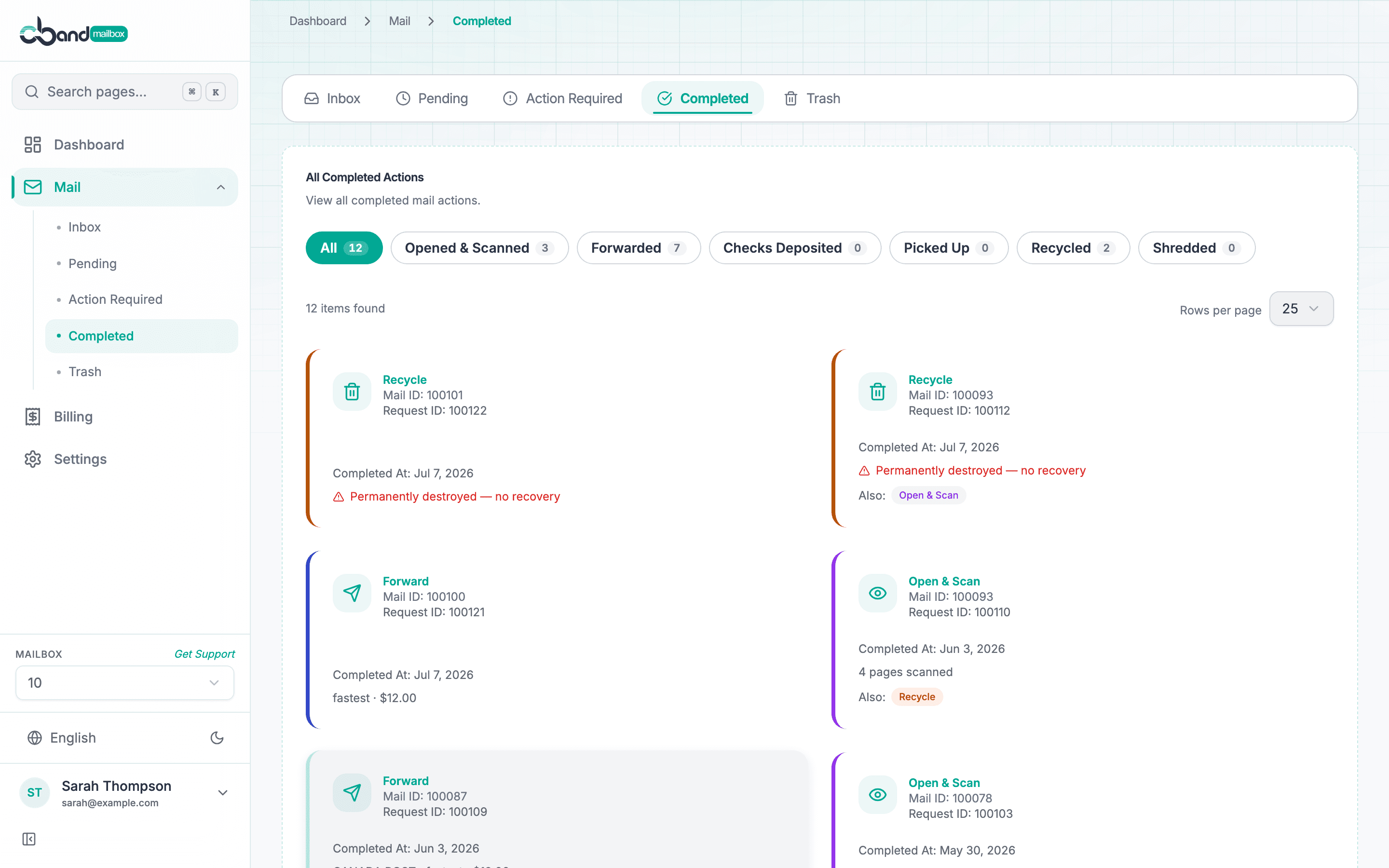
Completed mail actions history in the C-Band Mailbox dashboard

Kept at your partner location

An image of each item in your dashboard

A request for each next step

What is Mail Storage?

With a virtual mailbox from C-Band Mailbox, mail storage means your mail waits at the partner location that receives it while you request what happens to each item. The location logs the items it receives for you by uploading an image of each one to your dashboard. By default you get an email.

Plans set how long items are stored free and the fee that may follow, and you manage each item online. That suits a long absence, as for snowbirds and expats, when you place a request for each item before its free period ends.

You choose each item's next step with a request, from those your plan offers: a scan of the contents, mail forwarding to a saved address, including one abroad if the location ships there, a pickup, shredding or recycling.
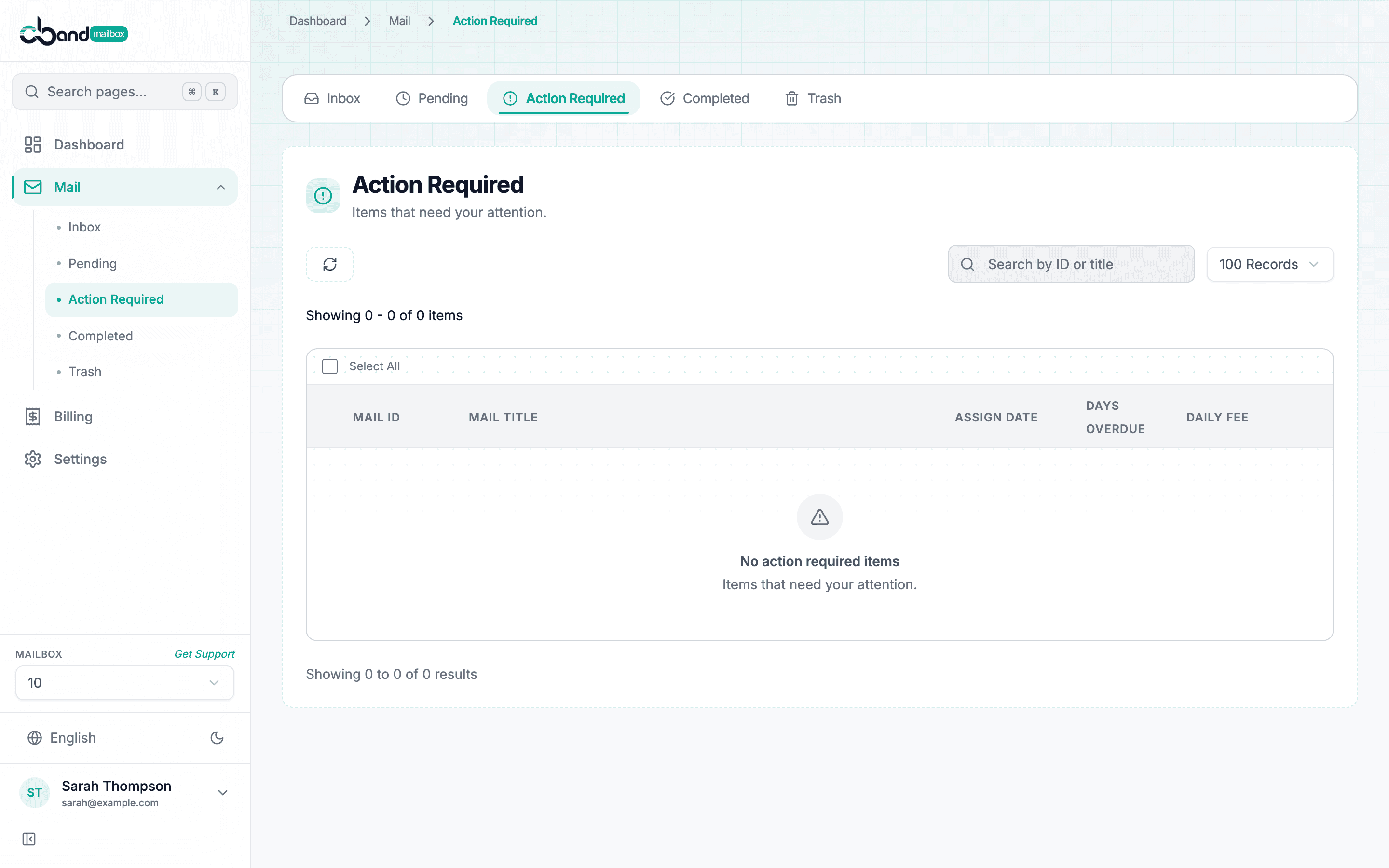
The Action Required tab in the renter dashboard, with Days Overdue and Daily Fee columns

Why keep your mail at a partner location

Mail keeps arriving

Your address is a partner location's street address with your box number. Letters and, at most partner locations, parcels from major carriers keep arriving while you are away; ask the location before you have parcels sent there.

You request each next step

You see each item and request what happens to it: a scan, a forward where the location ships, a pickup, shredding or recycling. A forward request can hold several items; for the other requests, each item you select becomes its own request.

Storage rules you can read first

The Full Details button on each plan lists the free storage period, any fee per item that follows it and the requests the plan offers. You can read them before you sign up.

Long absences need timely requests

The location keeps receiving and logging your mail while you travel. Your part is a request for each item before its free period ends; requests and mail views can be refused before approval and while your account is locked, for example after a failed payment.

How to manage stored mail while you're away

Your part, from choosing a plan to the last item.
1

Read the storage rules before you choose

On the location's plan page, the Full Details button lists each plan's free storage period, any storage fee per item that follows it and the requests the plan offers.
2

Keep the new-mail email on

By default you get an email when the location logs an item for you. You can change this in Settings, Email Notifications.

3

Request each item before its free period ends

Request a scan if needed, then a forward where the location ships, a pickup, shredding or recycling. Requests can be refused before approval or while your account is locked.

4

Check Action Required

The Action Required tab lists items past their free period, with days overdue and the daily fee, where the plan charges for storage.

5

Finish every item before you end your plan

A closed account takes no requests, and the renter terms say pending requests are cancelled on termination. Request each item early enough for the location to complete it.

What you can do with stored mail

Scans, forwards, pickups, shredding and recycling are requests you place from your dashboard, where your plan offers them.

  • 01

    See each item

    Open an item in your dashboard to see the image the location uploaded. You can download it as an image or PDF, or print it.

  • 02

    Scan the contents on request

    Opening and scanning the contents is a request you place. The scan pages appear with the item once the location completes it.

  • 03

    Forward, pick up, shred or recycle

    Send items to a saved address where the location ships, collect them, or have them shredded or recycled. A forward request can hold several items; for a pickup, shred or recycle, each item you select becomes its own request.

  • 04

    Watch Action Required

    Items past their free storage period appear in the Action Required tab, with days overdue and the daily fee, where the plan charges for storage.

Virtual mailbox storage or Canada Post Hold Mail

How a partner location keeps your mail, next to Canada Post Hold Mail at your own address

What is kept

C-Band Mailbox Letters and, at most partner locations, parcels from major carriers
Canada Post Hold Mail Lettermail, Registered Mail within Canada and magazines; parcels are not held

How long

C-Band Mailbox Your plan's free storage period, then a storage fee per item may apply; under the renter terms an item with no request can later be shredded or recycled
Canada Post Hold Mail Bought for the dates you choose; no published maximum, renewable before each expiry

While you are away

C-Band Mailbox An image of each item in your dashboard; scans of the contents on request
Canada Post Hold Mail Kept at a Canada Post facility; no pickup at any Canada Post location during the hold

Getting mail before you return

C-Band Mailbox Request a forward where the location ships, or a pickup
Canada Post Hold Mail Cancel the hold to resume delivery

Your part

C-Band Mailbox A request for each item before its free period ends
Canada Post Hold Mail Renew before each expiry, or delivery to your address resumes

Address

C-Band Mailbox A partner location's street address with your box number
Canada Post Hold Mail Your own address, where delivery stops during the hold; not available for mail received through a privately administered mailbox company
  1. Canada Post facts are from its Hold Mail pages and its Hold Mail guide (last updated March 25, 2026), opened 2026-10-25. The links are in our away-for-months guide.

Frequently Asked Questions

Common questions about Mail Storage

Can't find your answer? Contact us→

With C-Band Mailbox, your plan sets a free storage period, after which a storage fee per item may apply; the Full Details button on the plan page and the Billing, Usage tab show both. Storage days count from the day the location logs an item, weekends included. A request pauses the count, and a completed forward, pickup, shred or recycle ends it; after a scan, or a refused or cancelled request, it runs again. Under the renter terms, an item with no request can later be shredded or recycled.

Before you leave, read your plan's free storage period, and keep the new-mail email on and your payment method current: requests can be refused before approval and while your account is locked, for example after a failed payment, and storage keeps counting. For each item, request a scan if needed, then a forward, including abroad where the location ships, or shredding or recycling before its free period ends; under the renter terms, an item with no request can later be shredded or recycled. Other options: our away-for-months guide.

After your plan's free storage period, a storage fee per item may apply, counted by the day at the daily, weekly or monthly rate your plan sets, until a completed forward, pickup, shred or recycle stops the count. Where it applies, the item appears in your dashboard's Action Required tab with its days overdue and daily fee. Under the renter terms, an item with no request some time after that period can be shredded or recycled. No automatic storage email is sent, so check that tab while you are away.

Under the renter terms, if an item still has no request some time after its free storage period ends, your partner location may shred or recycle it, and the terms give no recourse for that loss. Until then, a storage fee per item may apply. To keep control, place a request for each item in time.

Yes, while your account is approved and not locked. When the location logs an item, it uploads an image or PDF of the outside, which you see when you open the item in your dashboard. You can download it as an image or a PDF, or print it. Opening and scanning the contents is a scan request you place, and the scan pages then appear with the item. Download any images and scans you need to keep before you close your account.

Yes, where the location accepts them: most partner locations take parcels from major carriers, so ask the location before you have parcels sent there. A parcel is logged like a letter, shows in your dashboard and follows the storage rules in your plan, plus any package fees in the location terms you accept at sign-up. Whether a location takes large or heavy items is up to the location, so ask first. To move a parcel, request a forward where the location ships, or a pickup.

Canada Post Hold Mail stops delivery at your own address and keeps Lettermail, Registered Mail within Canada and magazines, not parcels, at a Canada Post facility. Held mail cannot be picked up during the hold; Canada Post publishes no maximum but says the service can be renewed before each expiry. At a partner location, you see an image of each item while you are away and request a scan, a forward where the location ships, a pickup, shredding or recycling. Canada Post pages opened 2026-10-25; links in our away-for-months guide.

Your dashboard needs your sign-in and shows only the mail filed to your box. Staff at your partner location see the mail they receive for you, because they log it and carry out your requests. C-Band Mailbox administrators can also view an item's image and scans, for example in a support session, and each such view is recorded. Opening and scanning the contents is a request you place. The Privacy Policy in the site footer explains who else may receive your information.

Before you end your plan or close your account, give each item a forward, pickup, shred or recycle request early enough for the location to complete it; the renter terms say pending requests are cancelled on termination. After closing, the dashboard takes no requests: you may sign in for a limited time to view and download your mail, and you contact the location about forwarding or pickup. Under the renter terms and any location terms you accepted, items left without arrangements can be returned to sender, shredded or recycled.